
Coloring has become one of the most popular hobbies for both kids and adults. With so many free printable coloring pages available online, the question many people ask is: how to print coloring pages at home without losing quality?
In this detailed guide, we’ll explain everything you need to know—from choosing the right printer and paper to adjusting your settings for the best results. Whether you want to print coloring pages for kids, relaxing mandalas for adults, or cozy seasonal designs, this article will walk you through the process step by step.
Why Print Coloring Pages at Home?
Printing coloring pages at home has many advantages:
-
- Instant Access – Download and print pages whenever you want.
-
- Cost-Effective – No need to buy expensive coloring books.
-
- Customizable – Choose your own paper type and size.
-
- Family Fun – Print multiple copies so everyone can join.
When you know how to print coloring pages at home, you can turn any online design into a personal art activity.
Choosing the Right Printer for Coloring Pages
Inkjet vs. Laser Printers
-
- Inkjet Printers: Best for high-quality, detailed designs like mandalas and floral patterns. They handle color shading beautifully.
-
- Laser Printers: Faster and more cost-effective for bulk printing (like kids’ coloring pages). Lines are sharp but sometimes less detailed.
Recommended Printer Features
When considering how to print coloring pages at home effectively, look for:
-
- High resolution (at least 600 dpi).
-
- Ability to print on heavier paper (120–160 gsm).
-
- Duplex printing if you want both sides.
Best Paper for Printing Coloring Pages
The paper you choose makes a big difference in your coloring experience.
Standard Printer Paper
-
- Works for crayons and colored pencils.
-
- Affordable and easy to use.
-
- Might bleed if using markers.
Heavyweight Paper (Cardstock)
-
- Best for markers, gel pens, or water-based colors.
-
- Prevents ink bleeding.
-
- Feels more like a professional coloring book.
Specialty Paper
-
- Textured paper adds an artistic touch.
-
- Glossy or matte finishes can change the look of your coloring pages.
👉 If you want the best results for your cozy coloring pages or mandala pages, use heavyweight paper for durability and quality.
Step-by-Step: How to Print Coloring Pages at Home
Step 1: Download Your Coloring Page
-
- Find a trusted website (like ZenColoringFree.com) with free printable coloring pages.
-
- Save the file in PDF or high-resolution JPG format.
Step 2: Open the File
-
- Use Adobe Acrobat, Preview (Mac), or even your browser.
-
- Check the design size before printing.
Step 3: Adjust Printer Settings
-
- Paper Size: Select A4 or Letter (most coloring pages are designed for these).
-
- Orientation: Choose Portrait or Landscape depending on the design.
-
- Scale: Make sure “Fit to Page” is selected if the image is too big.
Step 4: Print a Test Page
-
- Always test one sheet first.
-
- Check line clarity, margins, and color (if using colored outlines).
Step 5: Print Final Copies
-
- Print multiple copies for kids.
-
- Print single copies on high-quality paper for adult coloring.
How to Print Free Coloring Pages Without Losing Quality
When searching how to print coloring pages at home, many people face blurry or low-quality results. Here’s how to avoid that:
-
- Always download high-resolution files (300 dpi or more).
-
- Avoid screenshots—they reduce image quality.
-
- Check printer ink levels for sharp black outlines.
-
- Use grayscale settings for black-and-white outlines.
Tips for Printing Coloring Pages for Kids
Kids love coloring, but they can be rough on paper. Here’s how to make it easier:
-
- Use standard printer paper (cheaper and replaceable).
-
- Print duplicates of favorite designs.
-
- Consider smaller page sizes (half-page designs are fun for kids).
- Print simple designs with fewer details for younger children.
Printer for Home use
Tips for Printing Coloring Pages for Adults
Adults often prefer detailed and cozy coloring pages like mandalas, floral patterns, or seasonal designs.
-
- Use heavyweight paper for durability.
-
- Print single-sided to prevent marker bleed-through.
-
- Scale designs slightly larger for intricate patterns.
-
- Store printed pages in folders or binders for easy access.
Advanced Printing Options
Double-Sided Printing
-
- Saves paper but not recommended for marker coloring.
Resizing Designs
-
- Want a smaller mandala? Reduce print size to 70%.
-
- Want a poster? Print at 200% and tape pages together.
Borderless Printing
-
- Great for full-page designs with no margins.
Common Problems When Printing Coloring Pages at Home
1. Faded Lines
-
- Replace ink cartridges.
-
- Adjust printer darkness settings.
2. Image Too Small/Big
-
- Change scale in printer settings.
-
- Select “Fit to Page” for automatic adjustment.
3. Ink Bleeding on Paper
-
- Switch to heavier paper.
-
- Use pencils instead of markers.
Organizing Printed Coloring Pages
Once you learn how to print coloring pages at home, you’ll likely have a big collection! Keep them organized:
-
- Use binders with clear sleeves.
-
- Group pages by category (animals, mandalas, holidays).
-
- Date your finished works to track progress.
Final Thoughts
Now that you know how to print coloring pages at home, you have the freedom to create your own personalized coloring book anytime. From cozy designs for adults to simple animals for kids, the possibilities are endless.
All you need is a printer, the right paper, and a bit of creativity. So, download your favorite free coloring pages, set up your printer, and start coloring your stress away today!
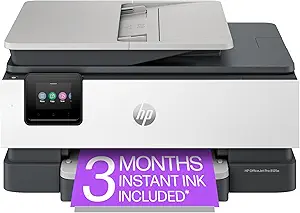
HP OfficeJet Pro 8125e Wireless All-in-One Color Inkjet Printer
HP OfficeJet Pro 8125e Wireless All-in-One Color Inkjet Printer, Print, scan, Copy, ADF, Duplex Printing, Home & Office, 3 Months of Instant Ink Included (405T6A)